
Get started with the bot
Open the bot, make a wallet, send SOL, add a rugger. Four buttons do the rest.
Open the bot
Use the link you received when you joined and type /start. The Dashboard shows your wallet, balance, ruggers and auto-buy status.
Create or import a wallet
💰 Wallets › Generate Wallet, or Import Wallet. Write down the private key: it is shown once.
Fund it
Send SOL to the wallet. About 0.2 SOL to start: 0.1 for a buy plus fees.
Add your first rugger
🎯 Ruggers › ➕ Add Rugger, paste the address. It arrives with no settings: you configure it.
Set it up and arm it
Tracking mode, buy, sell, protection, then Auto-Buy ON.
The four buttons
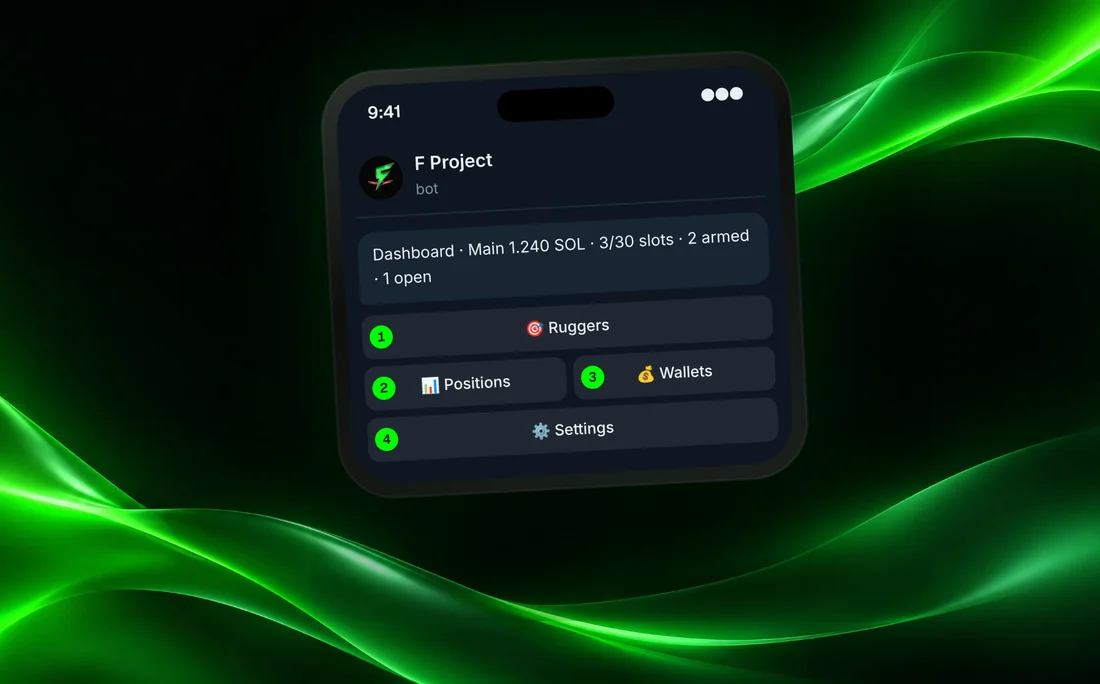
| # | Button | Opens |
|---|---|---|
| 1 | 🎯 Ruggers | The addresses you copy. Tap one to configure it. |
| 2 | 📊 Positions | Tokens you still hold. |
| 3 | 💰 Wallets | Create, import, fund, disperse SOL, claim cashback. |
| 4 | ⚙️ Settings | Language, timezone, notifications, referral, gas. |
Every screen has one ← Back button. On the Ruggers page, Global Auto-Buy and Global Auto-Sell switch everything on or off at once, handy at night.
Wallets
One wallet can follow up to 30 addresses, each with its own settings, so you rarely need separate wallets for separate strategies. Use 💸 Disperse SOL to fund several wallets in one go, and Claim cashback to collect  pump.fun cashback.
Never share your private key. The F Project team will never ask for it, on  Telegram,
 Discord or anywhere else.
Prefer a big screen? Every bot tracker is also editable from the terminal: My ruggers & tracker.