
Add & configure a rugger
A rugger is an address the bot watches for you: a creator to snipe, or a wallet to copy.
Add one
🎯 Ruggers › ➕ Add Rugger › paste the address. The bot creates it bare, with no settings. Apply a preset right after to save time. Give it a name with ✏️ Rename: "RugKing_42" reads better than "7xKp…3mNf".
The rugger screen
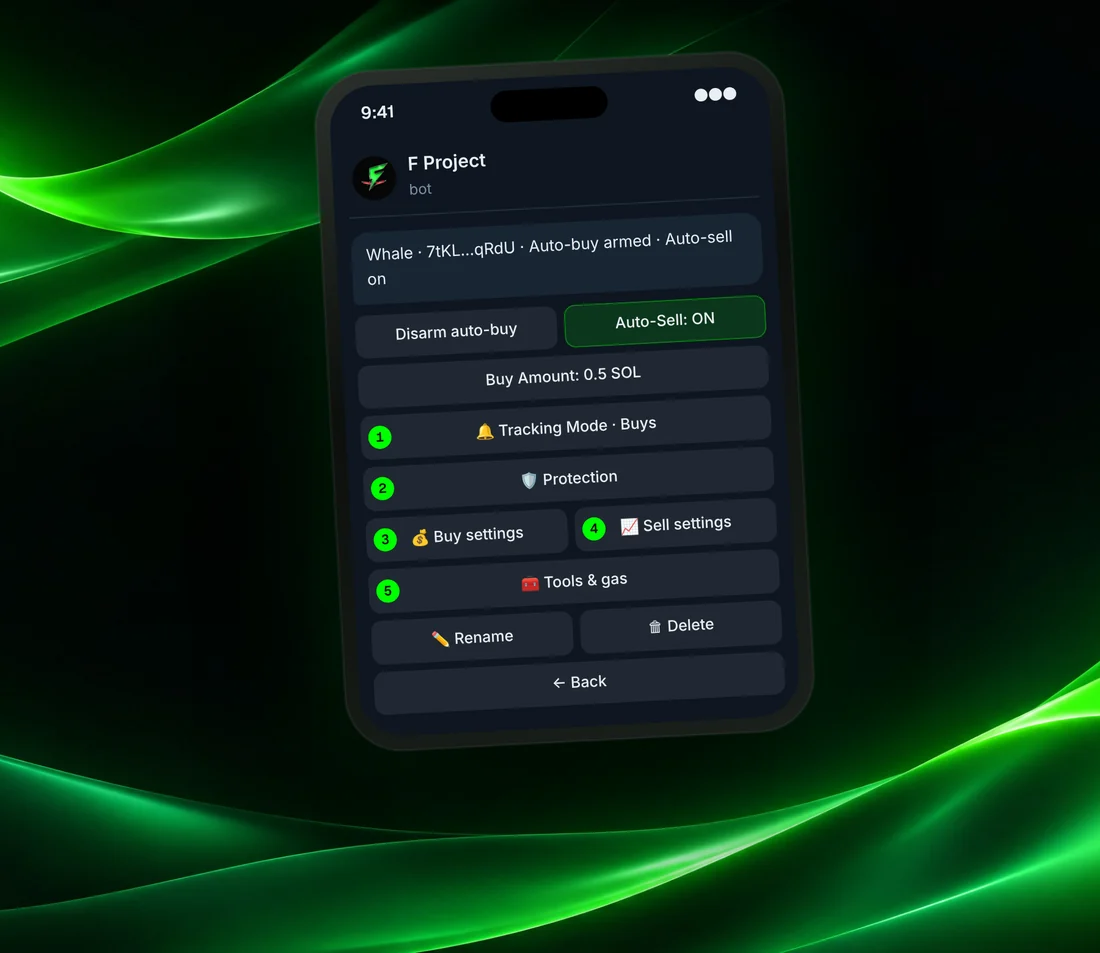
| # | Button | What you set |
|---|---|---|
| 1 | Tracking Mode | What the bot watches on this address. |
| 2 | Protection | Following wallet hops. See Rugger Protection. |
| 3 | Buy settings | How much, how fast, which tokens. See Buy config. |
| 4 | Sell settings | TP, trailing, no activity. See Sell config. |
| 5 | Tools & gas | Gas, buy hours, dev funding, trade history. |
Auto-Buy and Auto-Sell are independent: you can let the bot buy and sell by hand.
Tracking modes
| Mode | The bot… | Use it for |
|---|---|---|
| 🆕 New Token Creations | buys when this wallet launches a token. | Sniping a dev. |
| 📦 Track Buys | copies this wallet's buys. | Copy trading. |
| 📤 Track Sells | sells when this wallet sells a token you hold. | Copying exits. |
| 🔄 Buy on Dev Sell | buys when the dev starts selling. | An advanced strategy on a dev. |
Max Loss Counter
The bot counts losing sells. At your threshold (default 10, from 1 to 20) it pauses auto-buy and shows PAUSED. Open positions are not touched; you turn it back on yourself.
Losses are counted on the root rugger across all its child addresses, and one win anywhere in the chain resets the counter. Set 3–5 on a rugger you are still testing, 10–15 on one you trust.
Settings inheritance
When Protection adds a child address, it can inherit the parent's settings (default) or receive your Child Address Defaults.
If you use Keep Address ON, turn inheritance OFF. Otherwise every child also keeps its address and your 30 slots can fill up in minutes.